
What it is for?
A weekly or daily (rolling) recap can be configured for any brand in your platform. This recap will allow you to answer key questions about the selected brand without the need to enter in the platform. You will receive it directly in your Inbox.
Which questions can I answer with it?
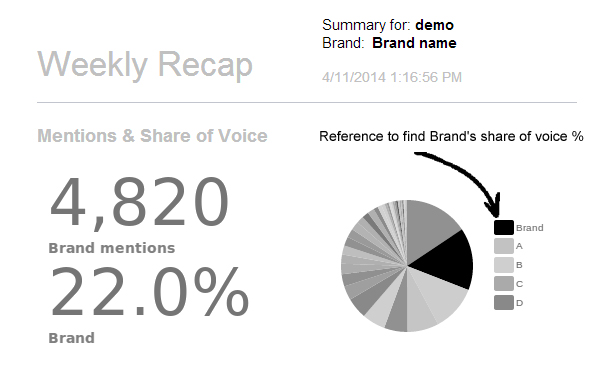
About mentions and Share of Voice
How many mentions does the selected brand received last week?
What is the Share of Voice?
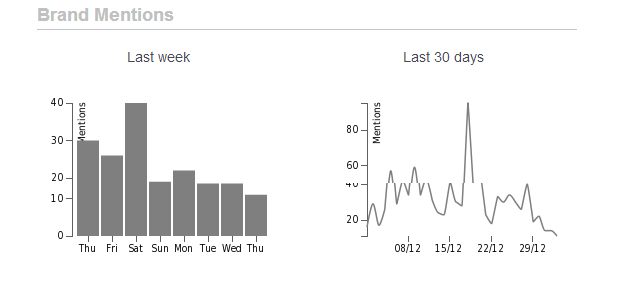
About the Brand mentions
Which is the volume of mentions received the last 7 and 30 days?
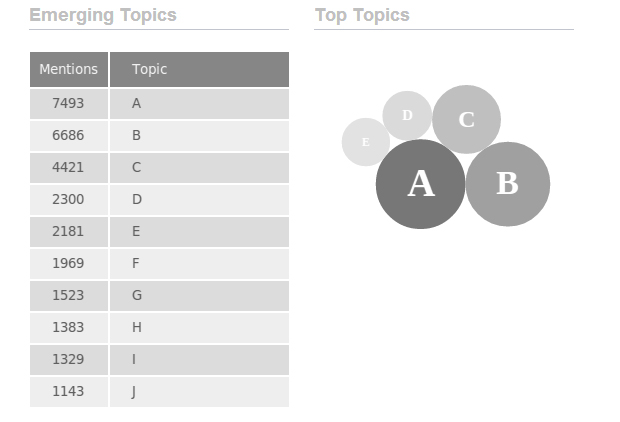
About the Emerging Topics
Which are the emerging topics about the brand?
Which are the top topics about the brand?
This chart will help you discover which are the most mentioned words around the monitored brand. It will help you find powerfull insights about the monitored brand.
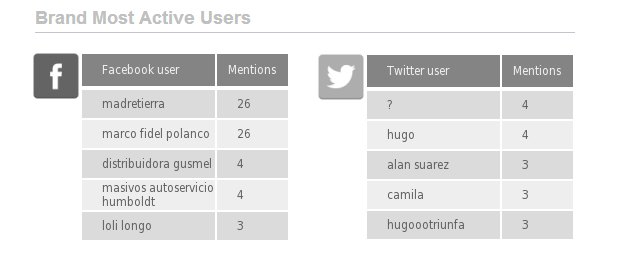
About users
Who are the most active users talking about the monitored brand, in Facebook and Twitter?
In which social network the brand has more mentions?
About capture and sentiment classification
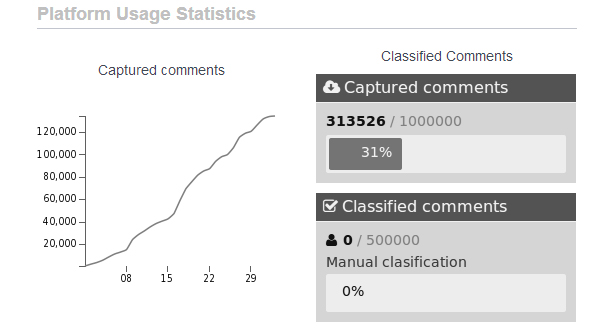
How many comments have been captured so far?
How many mentions have been classified so far?
Settings
1- Choose the frequency to receive the recap in your Inbox
Weekly: You will receive it every monday with information of the past week.
Daily: This report will be sent once a day. Each day includes information of the day before to be received.
2 - Choose to whom the Recap should be sent
If you are the administrator of the platform you can choose to receive it yourself only or all the users in the platform.
3 - Select the brand about which you want to get metrics
4 - Apply changes, and you're done.
Change the brand as many times as you desired.